


The move to Linux has started with the buying of hardware first of which is a refurbish Mini Form PC.
As I said this will take time and that I am not going to instantly just switch and delete my Windoze PC. However I have bought the hardware one part locally PB Tech and the second part online from Mighty Ape NZ
I bought this for $586.00NZD from PBTech NZ (obviously since it is a refurbished PC I don't know how many they have etc... so eventually this link will become extinct.
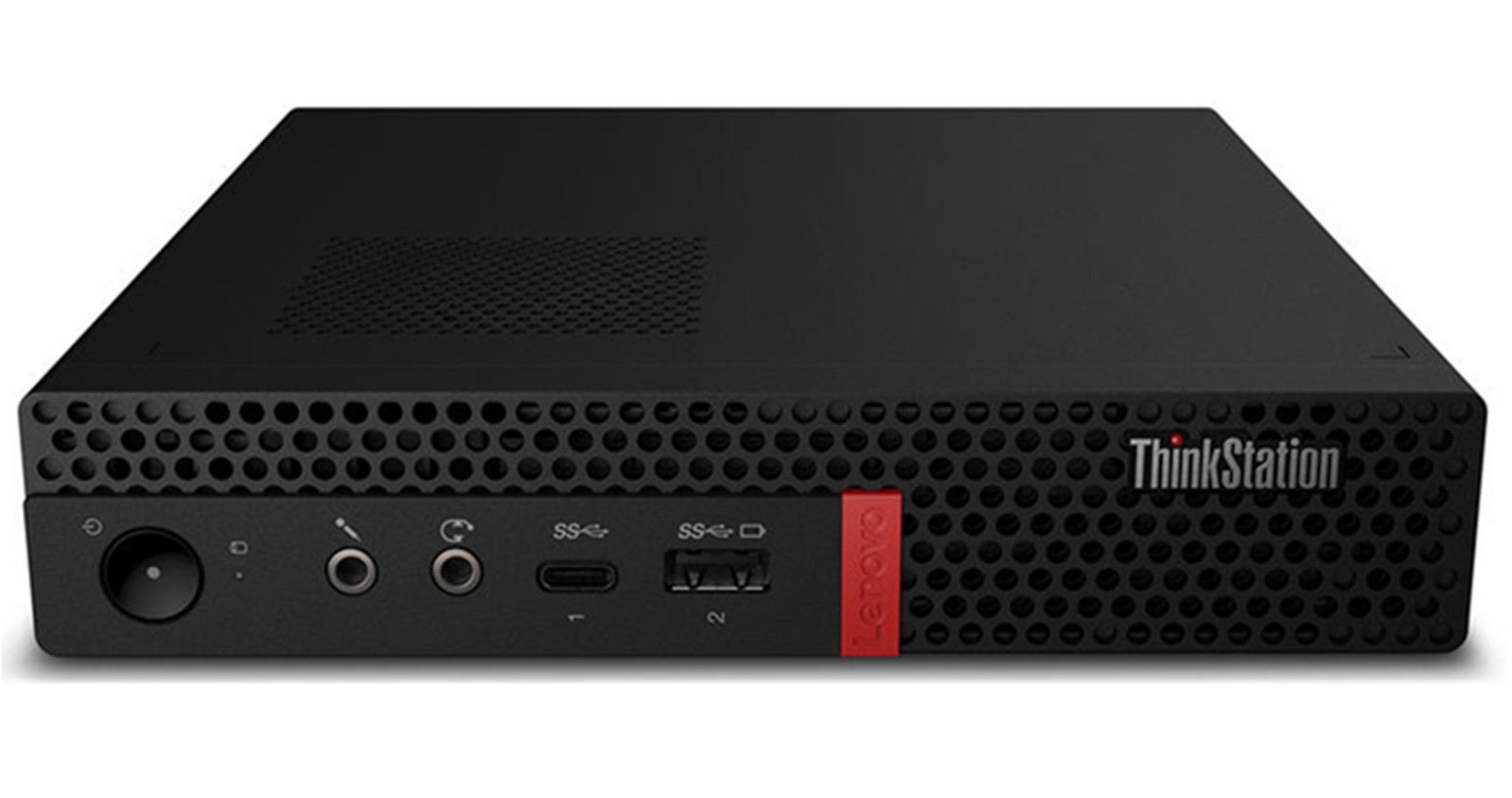
To be fair its full title is Lenovo Think Center P330 Intel Core i7-8700 Tiny Desktop PC (A Grade Refurbished) and its specs are as follows;
| Model | Lenovo Think Center P330 |
| Form Factor | Tiny Desktop PC |
| CPU | Intel Core i7-8700 |
| Memory | 16GB RAM |
| Storage | 256GB SSD |
| Operating System | Windows 11 Pro (now wiped) |
| Warranty | 18 Months Warranty |
Experience Power and Compact Efficiency with the Lenovo ThinkCentre P330 Tiny Desktop PC (A-Grade Refurbished)
Maximize your productivity with the Lenovo ThinkCentre P330 Tiny Desktop PC, expertly refurbished to A-Grade condition by PB Tech. Designed for professionals who need power in a space-saving form, this compact yet high-performance desktop delivers exceptional speed, reliability, and versatility for any workspace.
Powerful Performance
Equipped with an Intel Core i7-8700 processor, the ThinkCentre P330 delivers robust computing power to handle demanding applications, multitasking, and intensive workloads with ease. Whether you're working on complex projects, running multiple applications, or processing data, this desktop ensures seamless efficiency.
Enhanced Multitasking with 16GB RAM
With 16GB of RAM, experience smooth performance across all your tasks. From heavy-duty applications to everyday computing, enjoy lag-free multitasking and improved system responsiveness.
Fast and Secure Storage
A 256GB SSD provides ample storage for your files, applications, and essential data. Benefit from lightning-fast boot times, rapid file access, and an overall enhanced user experience, ensuring maximum efficiency in any work environment.
I have four or 5 external SSD HDD drives that I will also be using so storage is no a problem
Windows 11 Pro (Upgraded)
Pre-installed with Windows 11 Pro, this desktop offers an advanced, secure, and user-friendly operating system. Enjoy a modern interface, enhanced security features, and seamless integration with business applications to boost your productivity.
So since it was a refurbished PC PB Tech reinstalled Windows Pro on the system. I still got the PC cheaper refurbished with windows 11 Pro install than getting a brand new similar spec with no OS ready to install your OS of choice.
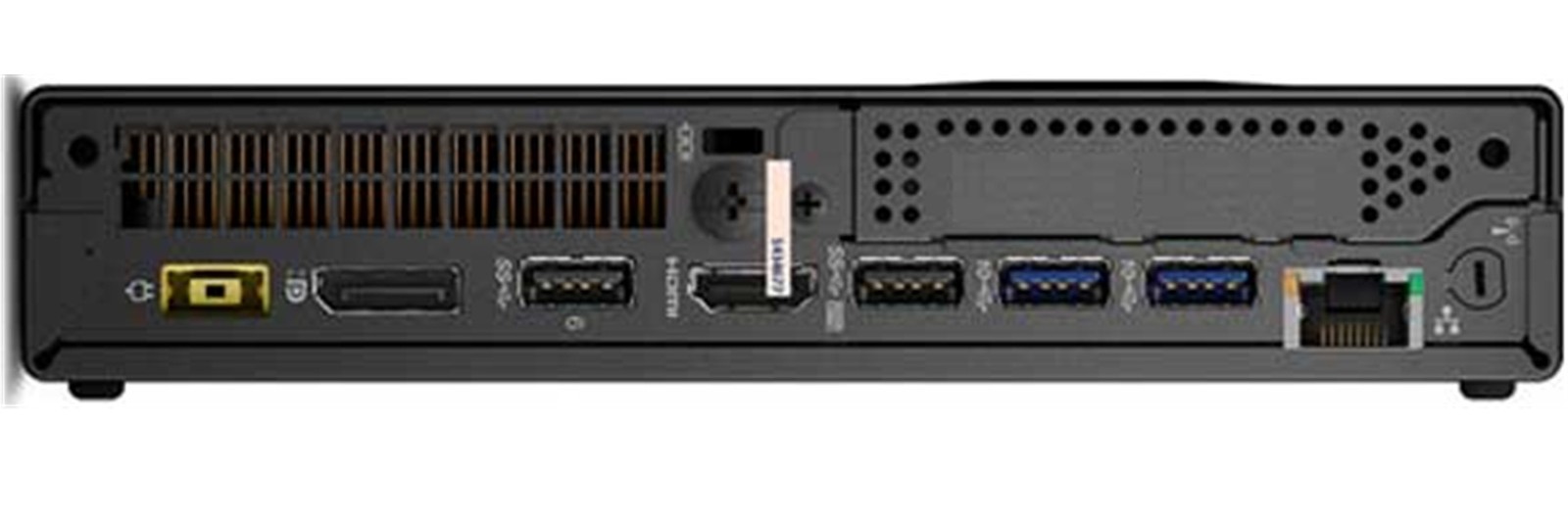
Ultra-Compact & Space-Saving Design
Designed to fit into any workspace, the ThinkCentre P330's ultra-compact form factor delivers powerful performance without taking up valuable desk space. Whether mounted behind a monitor or placed on a desk, it seamlessly blends into any setup.
Comprehensive Reconditioning
Refurbished by PB Tech's expert technicians, each ThinkCentre P330 undergoes rigorous testing and optimization to meet A-Grade standards. Every component is carefully inspected to ensure reliability, performance, and longevity.
18 Months Warranty for Peace of Mind
Backed by PB Tech's 18 Months Warranty, your refurbished ThinkCentre P330 is covered against defects in materials and workmanship. Work with confidence, knowing your device is supported by a trusted warranty.
Includes Power Adapter & Power Cord
This package includes both a power adapter and a power cord, ensuring you have everything you need to get started right away.
Versatile Connectivity for Maximum Productivity
Stay connected with a range of ports, including USB, DisplayPort, and Ethernet, allowing for seamless integration with peripherals and external displays. Whether you're working in an office, creative studio, or home setup, the ThinkCentre P330 offers the connectivity options you need.
READ MORE
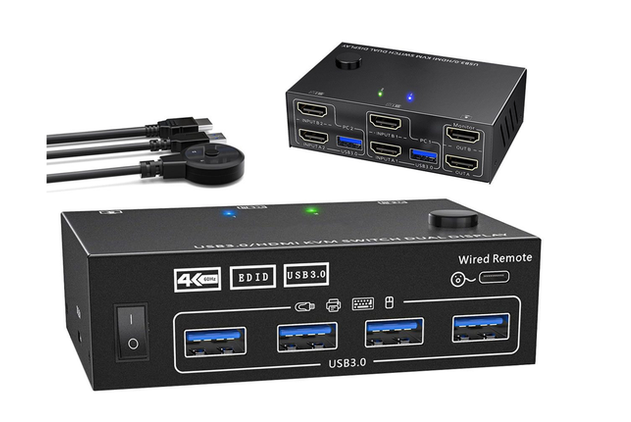
HDMI Dual Monitor KVM Switch USB 3.0 4K Dual Display Switcher for 2 PCs
Boost your productivity with this advanced HDMI Dual Monitor KVM Switch, designed to let you control 2 computers using 2 monitors, one keyboard, and one mouse. This HDMI Dual Monitor KVM Switch is ideal for home offices, workstations, and professional setups
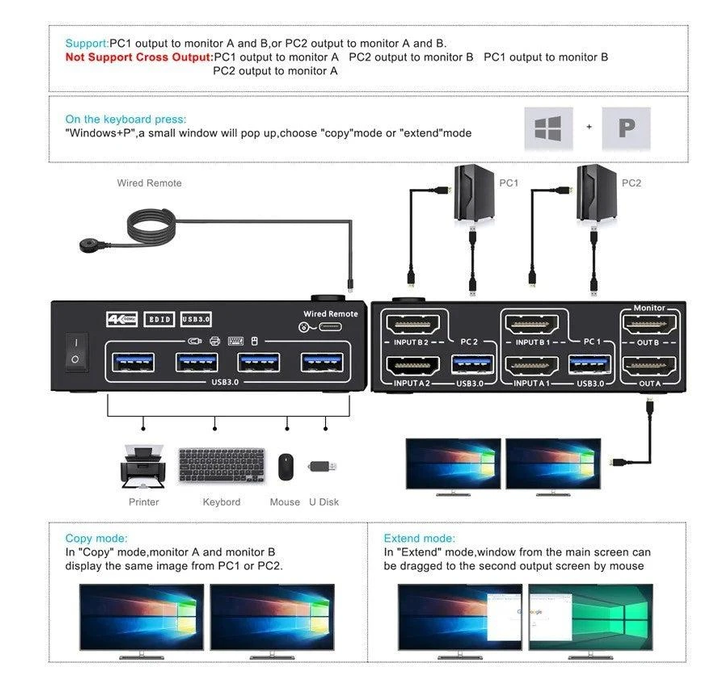
The HDMI Dual Monitor KVM Switch supports both extended and mirror display modes, allowing flexible screen management. With HDMI 2.0 support, thisHDMI Dual Monitor KVM Switch delivers ultra – clear visuals up to 4K 60Hz.
Equipped with USB 3.0 ports, this HDMI Dual Monitor KVM Switch ensures fast data transfer and seamless device connectivity. The built - in EDID emulation automatically adjusts display settings, making this HDMI Dual Monitor KVM Switch easy to use with different systems.
Advanced
- HDMI Dual Monitor KVM Switch for 2 PC Supports dual monitor extended and mirror display modes HDMI 2.0 compatible HDMI Dual Monitor KVM Switch
- USB 3.0 ports for fast data transfer
- EDID emulation for automatic display adjustment
- HDCP support for secure content transmission
- Button and remote switching options
- Plug and play HDMI Dual Monitor KVM Switch
- Compact and durable design
Specifications
- Product: HDMI Dual Monitor KVM Switch
- Video Standard: HDMI 2.0
- Max Resolution: 3840 × 2160 60Hz
- Additional Resolutions: 3440 x 1440 144Hz, 2560 × 1440 144Hz, 1920 x 1080 60Hz
- USB Interface: USB 3.0 (USB – A)
- Power Supply: USB Powered (Max 4W)
- Operating Temperature: -5 deg C to +70 deg C
- Dimensions: 10 × 6.5 × 4 cm
- Weight: Approx. 0.25 kg
Package Includes
- HDMI Dual Monitor KVM Switch
- 2 x USB 3.0 Cables
- 1 x Wired Remote Control
- 1 x User Manual
The KVM switch I was going to buy from PB Tech as well however they had none in stock that matched my needs of two PC's and dual Monitors. So the was bought off MightyAPE NZ for $135.00
While I said I have settled on LinuxMint which is a branch of Ubuntu which is based of Debian one of the oldest and most stable distributions, that doesn't mean I won't try others... however I am not one of these people that truly tinkers on there PC, once I get it working that that's it.
I don't know if any one is interested in all this and really I don't really care if your not, there may be some that are...
And as always there are heaps of people and youtube channels are now doing the same thing.